
Consumptive Water Use Permits
Water Use Permit Applicants
Did you know that scheduling a meeting with SFWMD permit application review staff before submitting an application is free, saves time and could result in quicker permit processing time? Project specifics will be discussed during the meeting, and staff will answer questions and inform applicants what information is required to be submitted in order to complete the application process.
To schedule a meeting, please contact us by email at wupreapp@sfwmd.gov or call (561) 682-2795.
If you have any questions or require assistance regarding Well Construction Permitting or Well Contractor Licensing, please contact us at wells@sfwmd.gov or (561) 682-6930.
A consumptive water use permit allows the holder to withdraw a specified amount of water from the ground (aquifers) or a canal, lake or river (surface water) for reasonable-beneficial uses. The water can be used for public supply (drinking water), agricultural and nursery plant irrigation, golf course irrigation, commercial use, dewatering/mining activities and power. Water uses not covered by these permits include domestic uses, home irrigation and water used for fire fighting.
Consumptive water use permits require water conservation to prevent wasteful uses, such as the reuse of reclaimed water (treated wastewater). The permits also set limits on how much water can be withdrawn at each location in the aquifer or from surface water. These limits protect existing residents' water supplies and protect aquifers from saltwater intrusion damage, and surface water sources from drying up.
Once a consumptive water use permit is issued by the District, SFWMD water use compliance staff monitor the use of water to make sure the permit's limiting conditions are met. Scientists and environmental analysts evaluate pumpage and monitoring data (chlorides, water levels, turbidity, etc.), and other compliance reports such as calibrations, wetland monitoring, unaccounted for water loss and 10-year compliance, and respond to instances of non-compliance. On-location site inspections also help determine compliance and document project activities, withdrawal facilities, and unpermitted uses of water.

For assistance with RegPermitting, please contact the RegPermitting Hotline at (561) 682-2281 or regpermitting@sfwmd.gov.
Related Links
- CFWI Supplemental Applicant's Handbook
- CFWI Rule Ch. 62-41
- Florida Statutes – Chapter 373
- Florida Administrative Codes
- Water Use Permitting Manual Vol. III [PDF]
- Applicant's Handbook for Water Use Permit Applications [PDF]
- Water Use Publications
- Blaney Net Depth of Application Area Maps
- Modified Blaney Spreadsheet
- UK-OPS Model Documentation Report, March 2020
- UK-OPS Model (Version 3.12P)
- UK-OPS Model (Version 3.12P) User Guide
- Kissimmee Reservation Rule Summary
Online Reporting Available
Water use compliance reports can be submitted online at RegPermitting. Create a RegPermitting account, or login if you already have an account, and click on ‘Submit Compliance Information’ and follow the prompts.
Calibration/Compliance Links
Types of Consumptive Water Use Permits
The South Florida Water Management District issues general and individual consumptive water use permits. Issues addressed during the application evaluation process are:
- Is the proposed use reasonable and beneficial as defined in Section 373.019 of the Florida Statutes?
- Will it interfere with other water users in the vicinity?
- Is it consistent with the public interest (including harm to the environment, saltwater intrusion, wetlands, movement of pollution, etc.)?
Consumptive water use permits are issued for a fixed period of time, and must be renewed prior to the expiration date in order to continue using water.
Water Use Forms
Water Use Permitting Fees
Fee amounts shall apply to applications for new permits, permit modifications, and permit renewals, except as noted. [PDF]
Contacts & Locations
- RegPermitting Help
regpermitting@sfwmd.gov
(561) 682-2281
- Governing Board Agenda
Lisandra Jones
(561) 682-6948
- Permit Copies
Paige Koch
(561) 682-6911
- Pre-Application Meeting
wupreapp@sfwmd.gov
- All Counties
RegPermitting
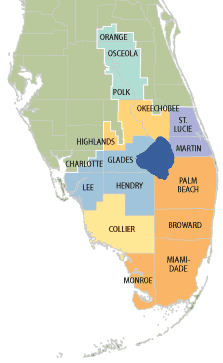 Broward, Miami-Dade, Monroe and Palm Beach counties
SFWMD Headquarters
Building B-1
3301 Gun Club Road
West Palm Beach, FL 33406
Phone: (561) 682-6736
- Charlotte, Collier, Hendry and Lee counties
Fort Myers Service Center
2301 McGregor Boulevard
Fort Myers, FL 33901
Phone: (239) 338-2929
- Glades, Highlands, Martin, Okeechobee and St. Lucie counties
Okeechobee Service Center
316 NW 5th Street
Okeechobee, FL 34972
Phone: (863) 462-5260
- Orange, Osceola and Polk counties
Orlando Service Center
7345 Greenbriar Parkway
Orlando, FL 32819
Phone: (407) 858-6100
- Charlotte, Collier and Lee counties
Sean Robertson, P.G.
(239) 338-2929 x7719 - Glades, Hendry, Highlands, Martin, Okeechobee, Palm Beach (west of 20 Mile Bend) and St. Lucie counties
Alicja Wojnar, P.G.
(561) 682-2229
- Broward, Miami-Dade, Monroe, Orange, Osceola, Palm Beach (east of 20 Mile Bend – Townships 41 through 43) and Polk counties
Nicholas Vitani, P.G.
(561) 682-2133
- Pre-Application Meeting Requests
wupreapp@sfwmd.gov
- Dry Wells Reporting
wucompliance@sfwmd.gov
(561) 682-2795
- Calibration
wucompliance@sfwmd.gov
(561) 682-2795
- Online Data Reporting
wucompliance@sfwmd.gov
(561) 682-2795
- Compliance Contacts [PDF]
- Jim Harmon
(561) 682-6777

RegPermitting
Apply, search or submit data
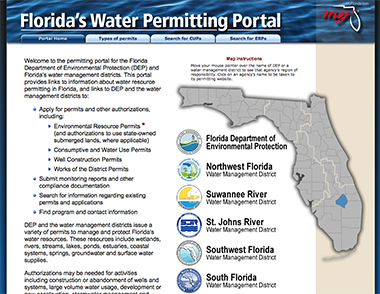
Florida's Water
Permitting Portal
Links to Florida water resource permitting information